Data analysis tools explained: Types, use cases, and how to choose the right one
April 23, 2026/10 min read/Jed Dougherty
Many analytics teams operate across notebooks, dashboards, and data warehouses simultaneously. But over time, logic can fragment between systems. A metric gets defined three times, updated once, and suddenly nothing matches. Teams waste hours reconciling numbers instead of analyzing results.
That fragmentation does not stop at analysis. Moving work into production creates even more friction, since models must be rebuilt, monitored, and reviewed, which stretches timelines and delays delivery.
That operational strain is not isolated. In the "Global AI Confessions Report: Data Leaders Edition," 95% of data leaders said they cannot fully trace how AI systems make decisions end-to-end. When logic is fragmented across notebooks, dashboards, and scripts, explainability gaps are almost inevitable, and production confidence declines.
These challenges raise a broader question: How should organizations evaluate the tools that power their analytics environments?
In this article, we outline the core types of data analysis tools, explore emerging trends shaping the market, and highlight the architectural considerations that matter for long-term scalability.
Analytics fragmentation slows delivery, and unified platforms reduce rework and accelerate production deployment.
Governance, lineage, and reproducibility are as critical as modeling power in enterprise environments.
Tool choice should align with data volume, collaboration needs, and long-term AI strategy.
AI adoption is accelerating, but operationalizing it at scale requires structured, governed analytics foundations.

Data analysis tools form the layer where teams prepare data, define transformations, compute metrics, and build models before results move into reports or applications.
Within this layer, teams typically:
Clean inconsistent records and join datasets.
Encode business rules into repeatable transformations.
Engineer features and test hypotheses.
Train predictive models.
Engineers then deploy those outputs through batch jobs, APIs, or services without re-creating logic from scratch.
These tools sit between storage and presentation. Warehouses and lakehouses handle ingestion and retention, while dashboards and applications present results. The analysis layer performs the reasoning that converts raw tables into validated metrics or predictions. Without it, teams either expose raw data directly or rebuild calculations repeatedly.
Separating analysis from visualization and engineering clarifies responsibilities. Visualization platforms focus on charts and dashboards but assume prepared data. Engineering systems concentrate on data movement and reliability. Analysis tools manage preparation, modeling, and validation, where business logic lives.
In enterprise environments, this layer also requires:
Lineage that traces metrics and models to source tables
Permission controls that govern access
Reproducibility across transformations and experiments
Without traceability, audits become manual and trust declines. Operational reliability matters as much as analytical capability.
Choosing the correct category of analysis tools affects speed, collaboration, and governance more than interface design. In practice, it determines whether analytics becomes repeatable or fragmented.
When teams operate within a shared environment, they benefit from:
Reusable preparation logic and shared datasets
Faster movement from raw data to production output
Cross-functional collaboration without isolated scripts
Built-in lineage and permission controls that make metrics traceable
On the other hand, fragmented environments create duplicated logic, manual pipelines, and higher compliance exposure. Over time, small inefficiencies compound into missed deadlines and declining confidence in results. A system designed for reuse, collaboration, and traceability helps prevent those risks from accumulating.
Most enterprises accumulate several categories over time. Each category addresses a specific need while creating boundaries that introduce friction. Understanding tradeoffs helps match the tool to the workload.
Spreadsheets remain the default analysis tool for business users because of their accessibility and speed. They:
Support small to medium datasets that fit in memory.
Enable fast, ad hoc analysis for business users.
Deliver quick calculations and one-off reporting.
Limit governance and reproducibility because logic resides in personal files.
Business intelligence platforms focus on visualizing curated data for decision-makers. They:
Provide visualization and structured business reporting through tools like Microsoft Power BI, Tableau, and Looker.
Rely on curated datasets prepared upstream.
Support KPI monitoring and executive storytelling.
Restrict heavy data preparation and experimental modeling.
Programming environments give technical teams full control over data transformation and modeling. These languages:
Offer maximum flexibility through Python and R.
Enable advanced data transformation and predictive modeling.
Require environment management and dependency control.
Reduce collaboration efficiency without disciplined versioning and lineage tracking.
SQL tools allow analysts to work directly inside data warehouses where enterprise data resides. Such tools:
Execute structured queries directly within data warehouses.
Keep computation close to storage to improve performance at scale.
Support metric calculation and structured transformations.
Require additional systems for complex modeling and orchestration.
Conversational analytics tools lower the barrier to exploration by translating natural language into code. They:
Generate SQL queries or code from natural language prompts.
Lower the barrier to exploratory analysis.
Accelerate early-stage prototyping.
Limit governance, version control, and traceability in production environments.
Distributed processing engines handle large-scale workloads across clusters. The engines:
Process very large datasets using distributed frameworks like Apache Spark.
Support batch and streaming data pipelines at scale.
Handle high-volume workloads reliably.
Demand specialized expertise and introduce operational overhead.
A structured evaluation produces better outcomes than feature comparisons.
Define data volume and refresh frequency. Small batch datasets do not require distributed clusters. Very large or streaming workloads benefit from parallel engines. Aligning capacity with workload avoids both underpowered and overly complex solutions.
Assess team skills and operating patterns. Analysts often prefer visual interfaces, while scientists expect programmatic control. If each group exports work between systems, collaboration slows. A shared environment that supports both approaches reduces friction.
Evaluate integration with existing infrastructure. Strong native connections to warehouses, identity systems, and deployment targets reduce data movement and simplify security. File exports or local copies introduce delays and inconsistency.
Consider the total operating cost. Licensing represents only part of the expense. Include infrastructure, maintenance, onboarding, and support. Platforms that remove manual steps can lower overall costs despite higher upfront pricing.
Confirm governance capabilities. The system should track lineage, manage permissions, record changes, and support audits. Built-in controls reduce risk compared with manual documentation.
Enterprise analytics tools vary widely in how they handle scale, collaboration, deployment, and governance. The table below summarizes where each platform performs best and where operational gaps may require additional systems.
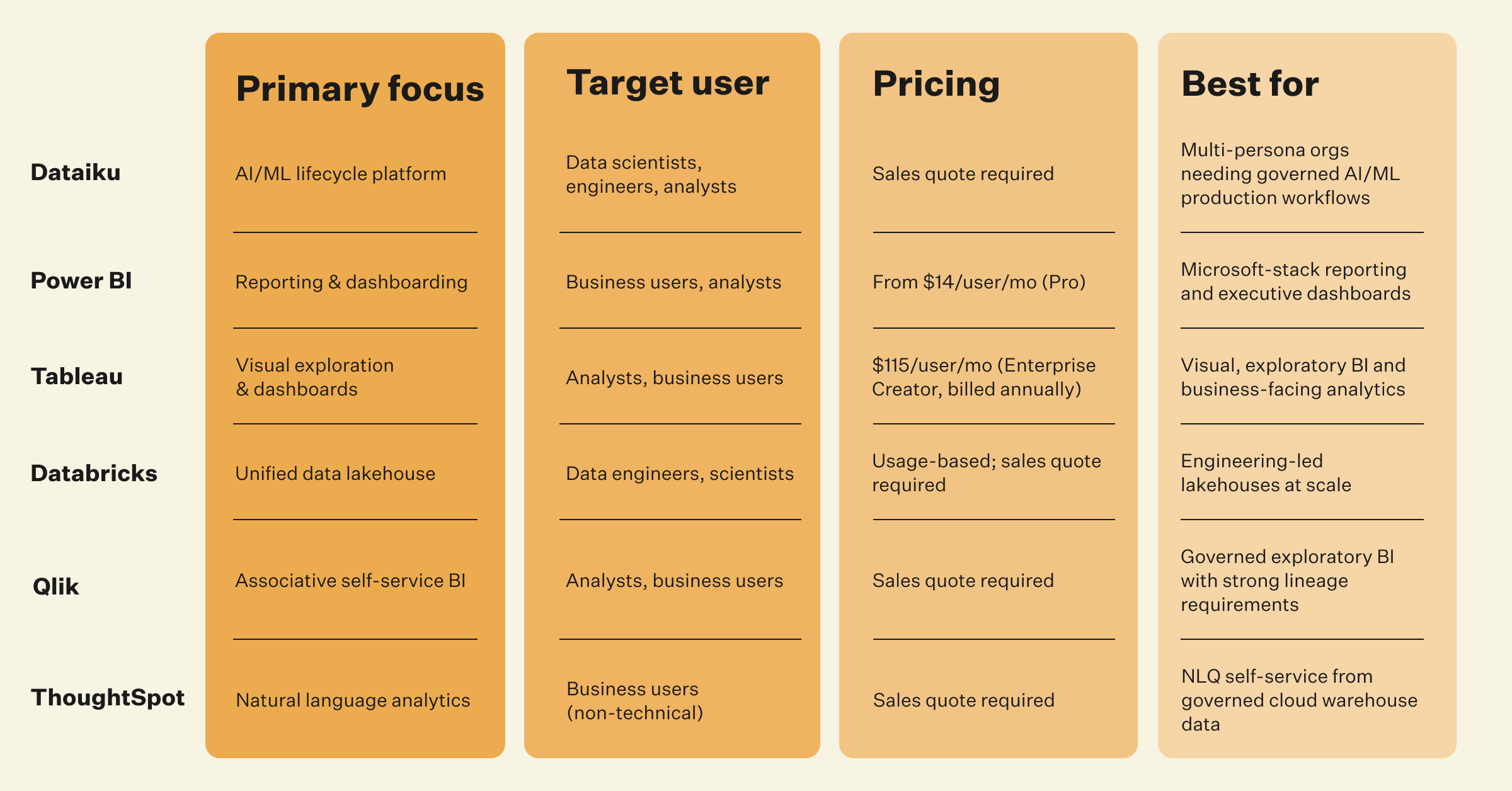
Click on the image above to zoom into full PDF
Microsoft Power BI is a trademark of Microsoft Corporation. Tableau is a trademark of Salesforce, Inc. Databricks is a trademark of Databricks, Inc. Qlik is a trademark of QlikTech International AB. ThoughtSpot is a trademark of ThoughtSpot, Inc. Dataiku is not affiliated with or endorsed by any of the above companies. All product capabilities referenced in this article are sourced from publicly available information. Sources are dated April 2026.
The reviews below follow the same criteria, so comparisons remain fair and practical. Each tool is evaluated based on how well it handles scale, supports collaboration, integrates with warehouses or lakehouses (centralized analytical storage such as Snowflake, BigQuery, or Databricks), enables deployment into production systems, and provides lineage and governance.
The goal is not to crown a single winner but to clarify where each option fits and where it creates operational gaps. Enterprise teams rarely fail because a tool lacks features. They fail because work must be rebuilt when it crosses system boundaries.
Dataiku, the Platform for AI Success, is an enterprise analytics platform designed to connect preparation, modeling, deployment, and governance inside one shared environment. Teams work on the same datasets and transformations through visual workflows or code notebooks without exporting logic between systems.
The Dataiku Flow automatically records lineage across every dataset, recipe, and model, which makes it possible to trace results from raw source tables to final outputs. Deployment happens directly from the platform as batch jobs, APIs, or applications, so successful experiments move into production without being rewritten by engineers.
Standout capabilities include hybrid visual and code workflows, centralized governance controls, model packaging for production, and orchestration across traditional machine learning and large language models. The platform reduces handoffs because analysts, data scientists, and engineers operate on the same artifacts rather than separate copies.
Pros
Shared environment eliminates duplicate transformations across teams.
Built-in lineage and audit trails simplify compliance reviews.
Direct deployment paths reduce engineering rewrites.
Cross-cloud compatibility supports on-premises and hybrid infrastructure.
Cons
Organizational adoption is required to realize full value.
It offers more capabilities than single-purpose reporting tools, which may not be needed for basic reporting.
Ideal use cases include organizations with multiple analytics personas that need consistent governance and reliable production workflows. Pricing is typically tiered by seats or capacity and aligns with other enterprise analytics platforms.
Power BI focuses on reporting and dashboarding for business stakeholders who need quick access to curated metrics. It connects directly to warehouses and databases and allows users to build interactive visualizations through a graphical interface.
Transformation logic is handled through Power Query and dataflows, which work well for moderately complex reporting needs. The platform is effective for distributing standardized dashboards across large audiences with consistent access controls.
Standout capabilities include tight integration with the Microsoft ecosystem, strong sharing features, and a mature calculation engine for business metrics. The system performs best when upstream data modeling is already complete.
Pros
Enables non-technical users to build reports through a graphical interface
Provides strong sharing and workspace access controls
Gives native connectors to many enterprise data sources
Offers Pro starting at $14 per user per month as of April 2026
Cons
Ties transformation logic directly to reports rather than reusable pipelines
Requires external tooling for production model deployment;ML capabilities depend on Azure Machine Learning integration
Ideal use cases include centralized reporting, executive dashboards, and operational monitoring across departments.
Tableau is a visualization-first analytics platform that emphasizes interactive exploration and high-quality dashboards. Analysts connect directly to data warehouses or extracts and build charts through drag-and-drop configuration. The system handles large aggregated datasets efficiently and allows stakeholders to explore data through filters and drill-downs.
Tableau Prep Builder handles basic data preparation flows, but Tableau's core design centers on visualization rather than complex multi-step data blending. Post-Salesforce acquisition, Tableau's product direction has deepened its integration with Salesforce Customer 360, reflecting Salesforce's strategy of building a unified CRM and analytics platform. Creator licenses for Enterprise Edition are priced at $115 per user per month, billed annually.
Pros
Delivers rich visual exploration and interactive dashboards
Supports a mature ecosystem with broad enterprise adoption
Handles large datasets efficiently through live connections
Provides conversational AI assistance for data preparation and visualization creation
Cons
It restricts calculation logic to dashboard-level implementations.
Governance and lineage require external processes beyond row-level security.
Ideal use cases include business-facing analytics and exploratory reporting.
Databricks is a unified, open analytics platform built on the data lakehouse architecture, designed for organizations that need to consolidate data engineering, analytics, and machine learning in a single environment. According to Databricks' own documentation, the platform integrates cloud storage and security in your cloud account and manages and deploys cloud infrastructure automatically. Over 60% of Fortune 500 companies use Databricks SQL for analytics and BI on the platform.
The platform's core strength is its lakehouse architecture, which combines the flexibility of data lakes with the performance of data warehouses. Unity Catalog provides unified governance across data, models, dashboards, and agents. Databricks SQL introduced native AI functions in 2025 so analysts can apply large language models directly in SQL, enabling summarization, classification, and extraction without switching tools.
The Databricks Assistant in Agent Mode automates multi-step tasks from a single prompt and became available by default for most customers in December 2025.
Pros
Unified platform spanning data engineering, analytics, ML, and AI
Unity Catalog that delivers lineage, access controls, and governance across all assets
Strong for large-scale workloads at the terabyte-to-petabyte scale
Native AI functions embedded directly in SQL for analyst workflows
Cons
Steeper learning curve for analyst personas compared to BI-first tools (in our assessment)
Visual interface less mature than dedicated BI platforms for executive reporting
Ideal use cases include organizations consolidating data engineering, ML, and analytics on a single governed lakehouse, particularly those already running workloads on AWS, Azure, or Google Cloud. Databricks pricing is usage-based; exact figures require a sales quote.
Qlik Cloud Analytics combines an associative analytics engine with governed self-service BI and AI-assisted data preparation. Qlik's associative engine lets users explore data relationships without predefined queries or rigid data models, surfacing connections that structured query approaches may miss. Qlik serves over 40,000 global customers and was recognized in the 2025 Gartner Magic Quadrant for Analytics and Business Intelligence Platforms.
Qlik introduced Data Flow capabilities in January 2025, providing a drag-and-drop interface for preparing datasets for analytics and AI without requiring technical scripting skills. The platform's end-to-end data lineage enables users to trace data from source to output and understand the downstream impact of changes, which supports governance requirements for enterprise analytics teams.
Pros
Associative engine surfaces data relationships without predefined query paths.
End-to-end lineage and governance is built into Qlik Cloud Analytics.
No-code data preparation via Data Flow reduces reliance on scripting.
It has strong governance relative to other BI-focused platforms (in our assessment).
Cons
ML and advanced model deployment capabilities are more limited than data science platforms (in our assessment).
Qlik Sense on Windows carries a steeper interface learning curve for less technical users.
Pricing is not published directly; requires a sales quote.
ThoughtSpot is an agentic analytics platform built around natural language querying and search-first data exploration. Spotter, ThoughtSpot's AI analyst, allows business users to ask questions in natural language and receive answers directly from cloud data warehouses without requiring SQL knowledge or data modeling skills.
ThoughtSpot launched the next generation of Analyst Studio in February 2026, introducing agentic data preparation capabilities, including a native spreadsheet interface and a data prep agent. ThoughtSpot connects directly to major cloud data warehouses without requiring data migration, allowing existing infrastructure to remain in place while adding a natural language analytics layer.
Pros
Natural language querying via Spotter lowers the barrier for non-technical business users.
It was recognized as a Leader in the 2025 Gartner Magic Quadrant for Analytics and BI Platforms.
Analyst Studio brings ad hoc exploration, data modeling, and AI-powered insights into a single workspace.
It connects to cloud warehouses without requiring data movement.
Cons
Optimized for ad-hoc questions and dashboards; complex multi-step data preparation and ML model building remain outside core scope (in our assessment)
Analyst Studio's agentic data prep capabilities launched in February 2026 and are focused on AI readiness workflows rather than full data science pipelines
Requires a modeled data layer upstream; governance improving but not as mature as dedicated data governance platforms (in our assessment)
Ideal use cases include organizations whose primary need is enabling business users to self-serve answers from governed cloud warehouse data, particularly where natural language accessibility is a priority.
Low-code analytics, real-time streaming, and GenAI copilots are reshaping which data analysis tools organizations prioritize. McKinsey reports that 23% of respondents are already scaling agentic AI systems, with another 39% experimenting. O'Reilly data shows prompt engineering interest up 456% year over year, signaling that AI-assisted analysis is becoming a baseline competency.
Investing in a platform that combines BI, ML, and GenAI on a governed foundation reduces the risk of yet another fragmented stack. According to "7 Career-Making AI Decisions for CIOs in 2026," based on a Dataiku/Harris Poll survey, 74% of leaders regret at least one major AI vendor or platform decision made in the past 18 months, and 60% believe their role would be at high risk if an AI bubble were to burst. Platform fragmentation is no longer just inefficient — it is career-defining.
Dataiku's agentic, model, and analytics capabilities help CDOs consolidate tooling while maintaining strong governance controls across self-service analytics, ML model development and deployment, and agentic AI workflows.
The right data analysis tools align with your data volume, your team's skill mix, and your governance requirements. With 88% of organizations now using AI regularly, the tools you select must support both today's BI workflows and tomorrow's GenAI workloads.
Dataiku gives data leaders a single governed workspace for every analytical workflow, whether built by a data scientist in Python or a business analyst using visual tools. Start with the five-step checklist above, evaluate candidates against real workloads, and invest in a platform your team won't outgrow.
The four primary types of data analysis are descriptive (what happened), diagnostic (why it happened), predictive (what is likely to happen), and prescriptive (what action to take). Together, they move organizations from reporting historical metrics to guiding operational and strategic decisions.
Data analysis tools are software platforms that support data preparation, transformation, visualization, modeling, and deployment. They range from spreadsheets and BI dashboards to programming environments and distributed engines, each optimized for specific workloads, collaboration models, and governance requirements.
The seven steps of data analysis typically include defining objectives, collecting data, cleaning and preparing data, exploring patterns, modeling or analyzing results, validating findings, and communicating insights. In enterprise settings, governance, documentation, and deployment are integrated throughout this lifecycle.