Decision models, part 2: how to choose the right one for your process
October 29, 2026/9 min/Christiaan Burrett & Youssef Jouini
Decision models are everywhere. In the month since TypeSafe announced Jev, big players such as OpenAI, Microsoft, Cloudflare, Perplexity, AWS and NVIDIA have shipped their own, some with open weights, some closed. TypeSafe has since released Jev 1.14, the version tested here.
In part 1 (Jev inside a Dataiku agent), we showed what putting Jev inside a Dataiku Structured Visual Agent looks like. Jev was quicker and cheaper than the two LLMs we compared it with, but they were more accurate. As a reminder, a decision model doesn't write text: you ask it a typed question (yes or no, one of a few categories, or a score on a scale) and it returns a probability for each possible answer (for a refresher, head to part 1).
Most published numbers on the new decision models come from the vendors themselves, and the newly launched Artificial Analysis Decision Index leaderboard covers some of them, but on generic tasks. So we tested them the way you would in Dataiku: we kept the task and agent design from part 1 and extended the comparison to eight decision models.
The models turned out to be only half of the story. The other half sits in the routing rules of our own use case: that is what the lessons below are about.
We tested eight decision models, with two OpenAI LLMs as the baseline: GPT-6.1 Sol and GPT-6 Luna. Clef, Clef-flash, Perplexity Decider and Strands Decider have open weights, so you can run them on your own hardware.
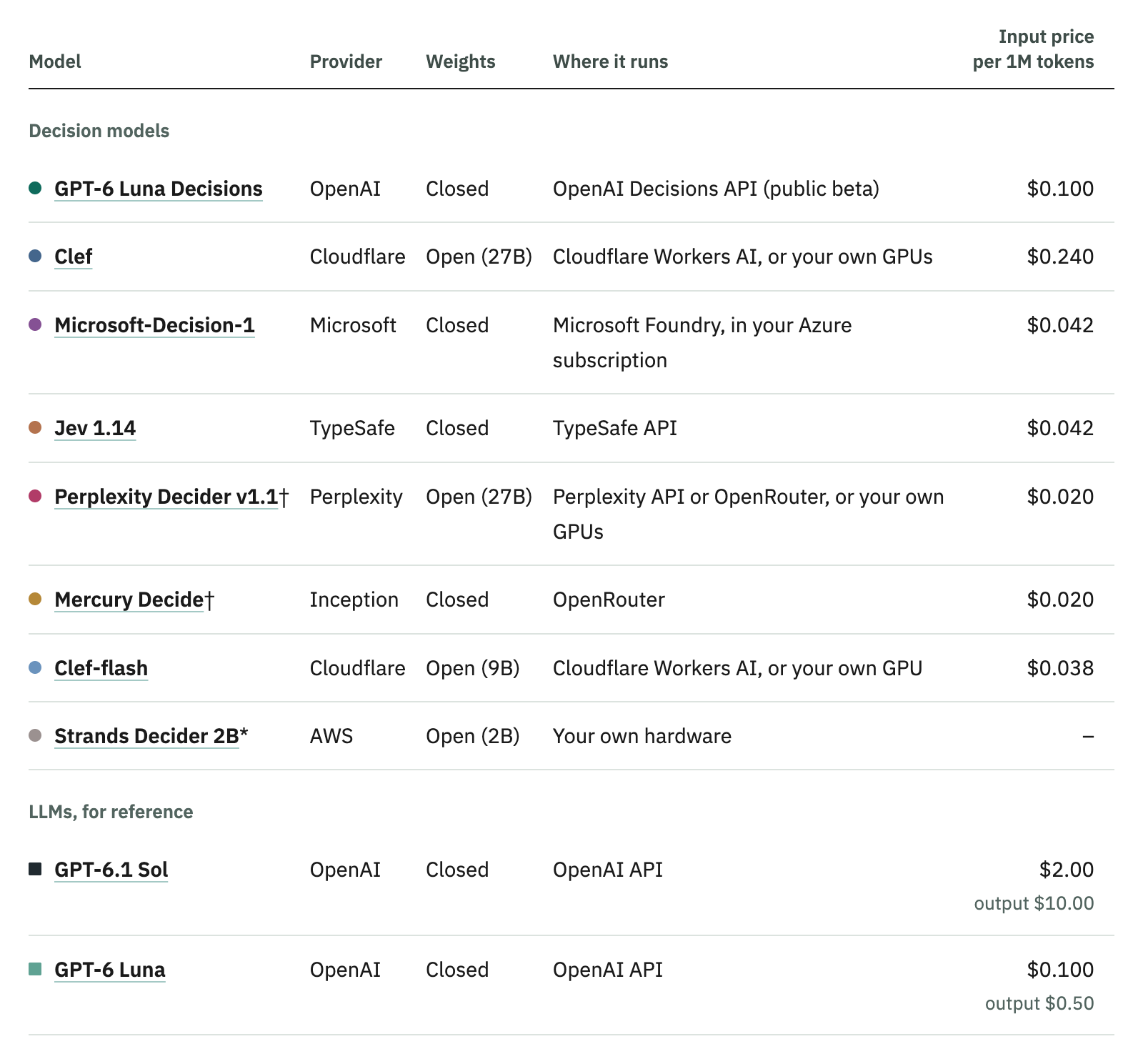
* Run on our Dataiku instance's CPU. † Called through OpenRouter, at OpenRouter's price. Clef and Clef-flash ran on Cloudflare Workers AI. List prices on 12 October 2026, per million input tokens.
An agent receives a supplier onboarding request, asks the model three questions about it, and a set of rules turns the answers into a route: send the request to a human for review, ask the supplier for more details, or follow the standard queue.
We expanded the test set to 248 requests, each labeled with the one route it should follow. They cover the cases procurement teams care about: payments or contract terms outside policy, suppliers who would gain access to customer or employee data, and requests that are too vague to act on. Between runs, only the model answering the questions changes.
The requests are synthetic. We wrote them with help from Anthropic's Claude, labeled them, and reviewed them, so they are cleaner than a real queue.
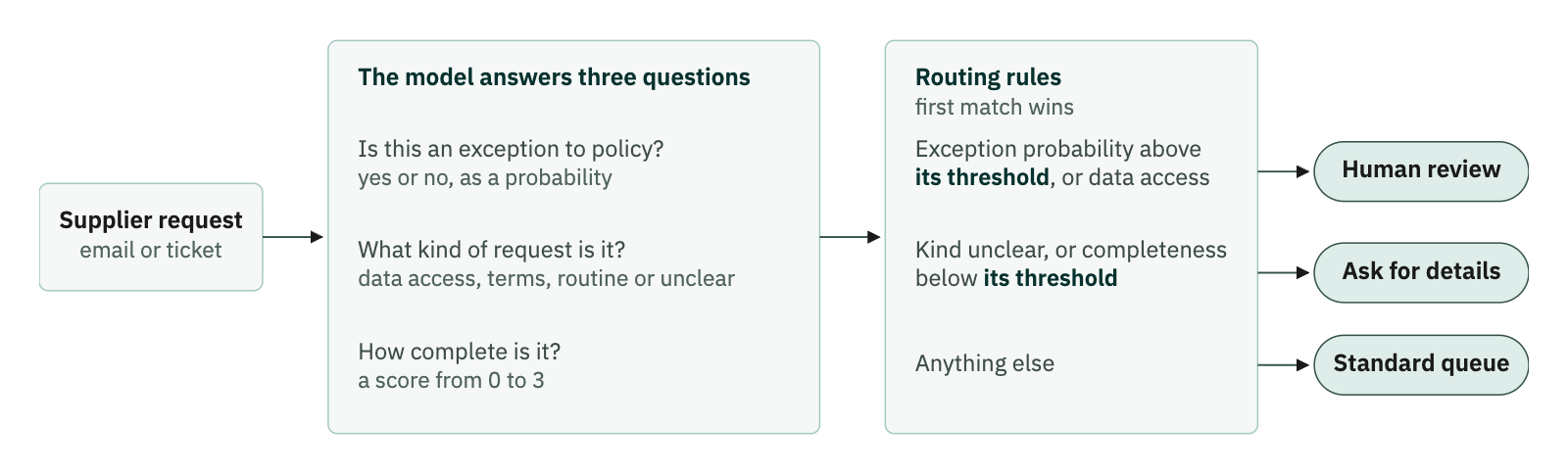
The routing rules, checked in order. Two numbers in them, the exception threshold and the completeness threshold, are not fixed by the model; both are explained below.
In Dataiku, each model sits behind its own version of the same visual agent. A first block asks the three questions: for a decision model, the question block of the TypeSafe AI plugin, which calls the model through the LLM Mesh and returns a probability for each answer; for an LLM, a standard LLM Mesh request. A routing block then applies the rules, so swapping the model is one of the settings in the agent.
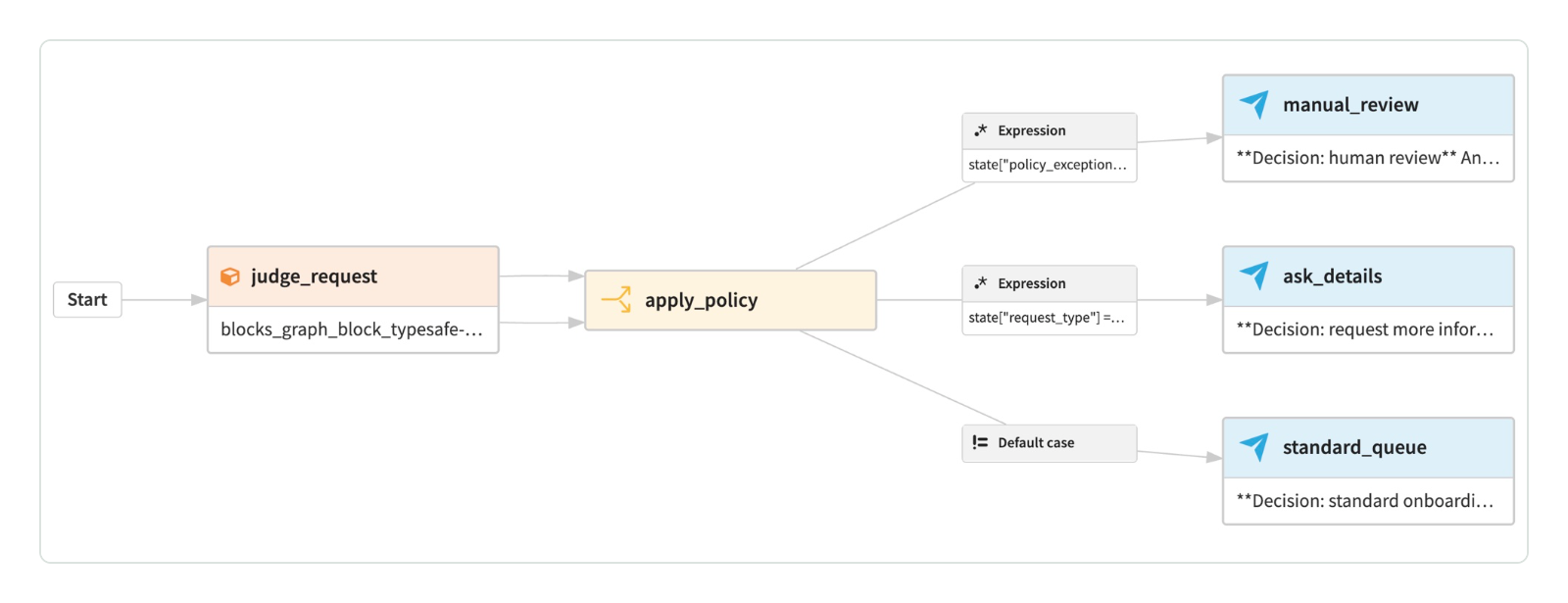
The Structured Visual Agent: the question block feeds a routing block, which sends each request to one of three outputs.
The exception threshold. A decision model answers "is this an exception to policy?" with a probability. The threshold is the probability above which a request goes to a person. The intuitive choice is a value that reads as "fairly sure", such as 0.7. An LLM answers yes or no, so this threshold doesn't apply to it.
The completeness threshold. Every model scores how complete a request is, from 0 to 3, following a short scoring guide:
0 Almost no context: the supplier or the requested action is missing.
1 The request is recognizable, but its purpose or important details are missing.
2 Supplier, requested action, and business purpose are stated; some details remain open.
3 Supplier, requested action, business purpose, and supporting details are all clearly stated.
A decision model gives a probability to each level, and its score is the average of the levels weighted by those probabilities; an LLM picks a single score. Below the completeness threshold, the agent asks for details; at or above it, the request goes to the standard queue. Our intuitive choice was 2, the first level where supplier, action, and purpose are all stated.
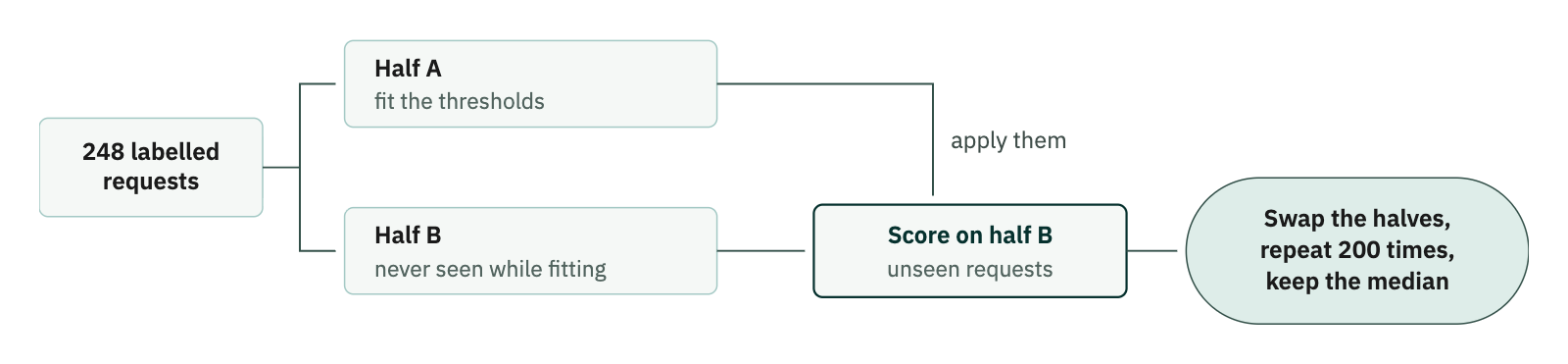
Each model's thresholds are fitted to one half of the requests and scored on the other half, so every request is scored once per split. All accuracies below are medians over the 200 splits.
GPT-6 Luna Decisions routed 91% of requests correctly, and GPT-6.1 Sol 92%; each was right on about a dozen requests the other got wrong. The clear difference is in cost and speed: GPT-6 Luna Decisions cost about 4% as much as Sol and answered in about 0.1 s, whereas Sol took almost 5 s.
Perplexity Decider, Clef, Jev, Mercury Decide, and Microsoft-Decision-1 landed near 86%. Clef-flash and Strands Decider were further behind, at 77% and 65% respectively.
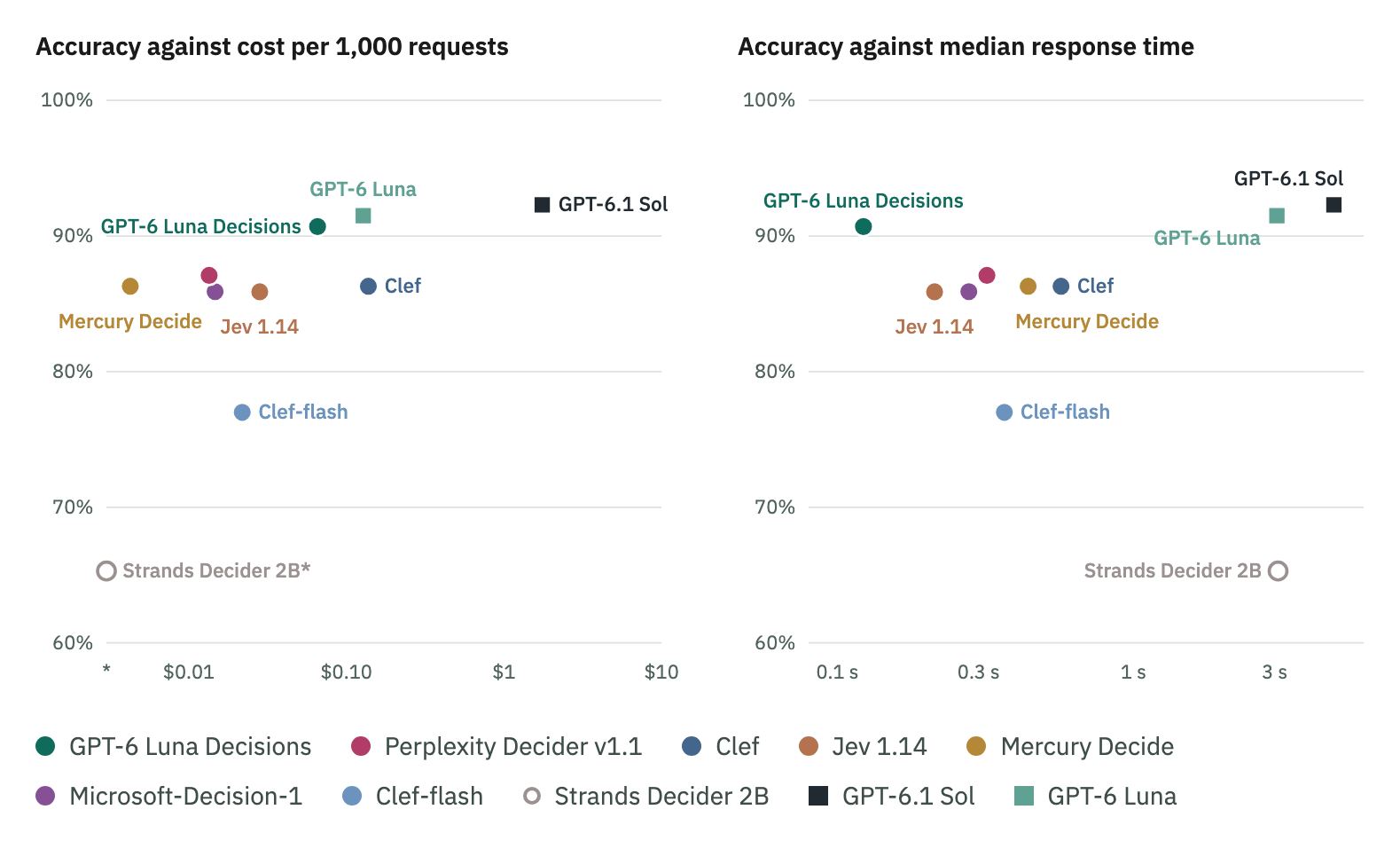
Circles are decision models and squares are LLMs. Strands Decider has no hosted API, so it sits on the cost axis, marked *, and its open circle on the speed chart is a time measured on our own CPU. Response times depend on where each API runs, so read both axes as orders of magnitude.
The exception threshold assumes a probability can be read as a confidence. That only works if the probabilities are calibrated: of all the requests a model scores at 0.7, 70% should be real exceptions.
Overall, the better models look calibrated, a few points off on average. But that score is flattered by the many obvious standard queue requests, which get a probability close to zero. In the range where the threshold actually sits, between 0.2 and 0.8, most models are underconfident about flagging exceptions, so our initial threshold of 0.7 let many exceptions through to the standard queue.
On the other hand, the ordering was right for most models: a real exception nearly always scored higher than an ordinary request.
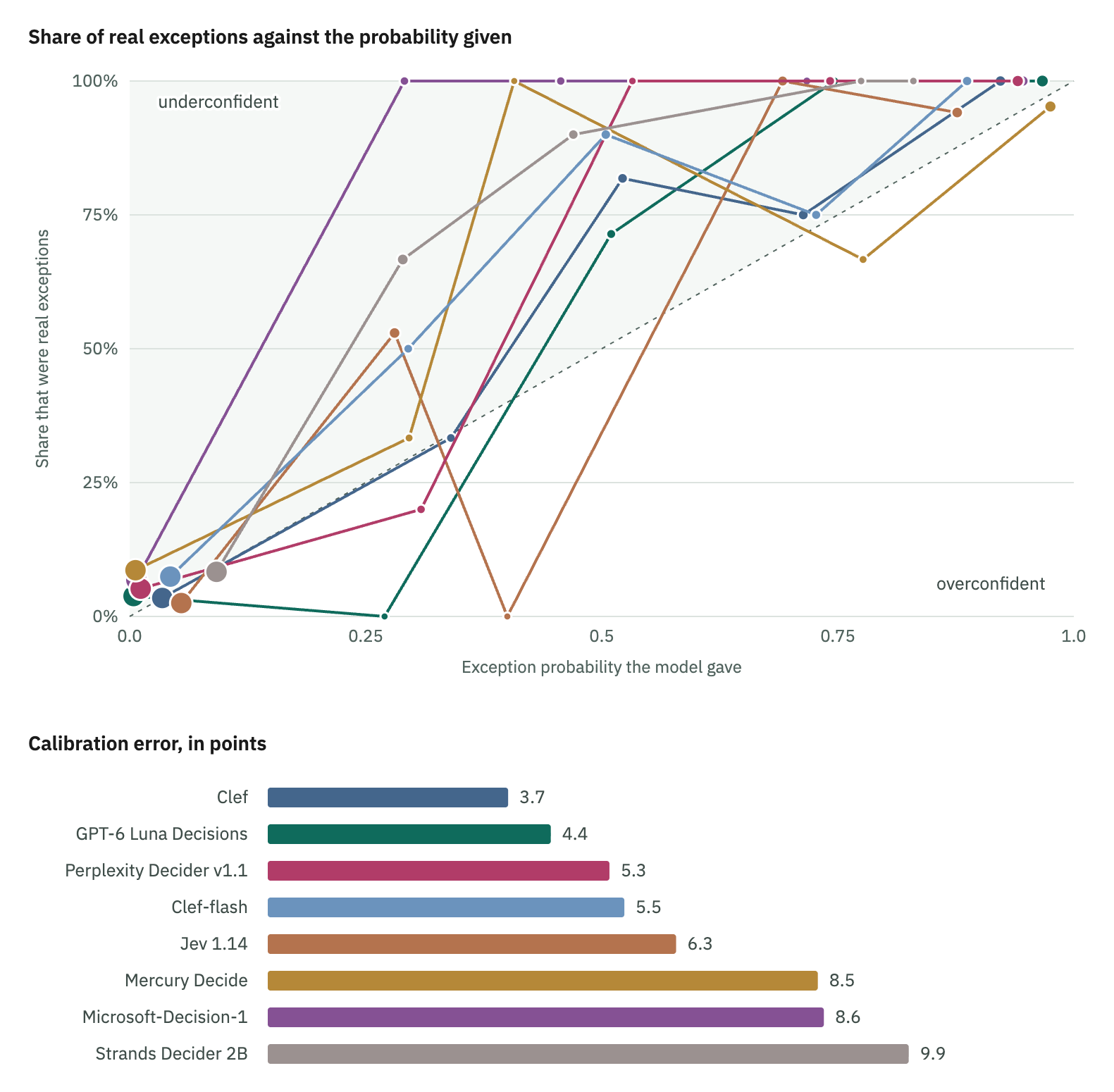
Requests are grouped by the exception probability the model assigned to them. Larger points hold more requests. On the diagonal, a probability can be taken at face value; in the area above it, the model is underconfident. The calibration error is the average gap between probability and reality over ten probability bins, weighted by the number of requests; zero is perfect.
This means the best threshold sits well below 0.7 for most models. Ordinary requests almost all get a probability near zero, while real exceptions are spread out, many of them below 0.5, so lowering the threshold catches more exceptions at little cost. For Clef, going from 0.7 to 0.3 catches 84% of the 43 exceptions instead of 49%, at the cost of seven more false alarms.
One caveat: our score counts a missed review and an unnecessary one the same; a team that fears missed reviews more would set the threshold lower.
A decision model doesn't just pick the completeness score: it shows how sure it is. It gives a probability to each level, so a request it hesitates on gets an in-between score, and that close call is visible in the output. An LLM commits to one number, so a borderline request looks exactly like a clear one.
Borderline requests, where the supplier and the action are clear, but the purpose isn't, show the difference. On 14 of them, GPT-6.1 Sol gave a score of exactly 2, the threshold itself, which sends them to the standard queue. GPT-6 Luna Decisions asked for details on 10 of the same 14: its doubt pulled the score below 2. Raising Sol's threshold just above 2 catches all of them, but also sends 4 complete requests back for details. The chart below shows one such request through both models.
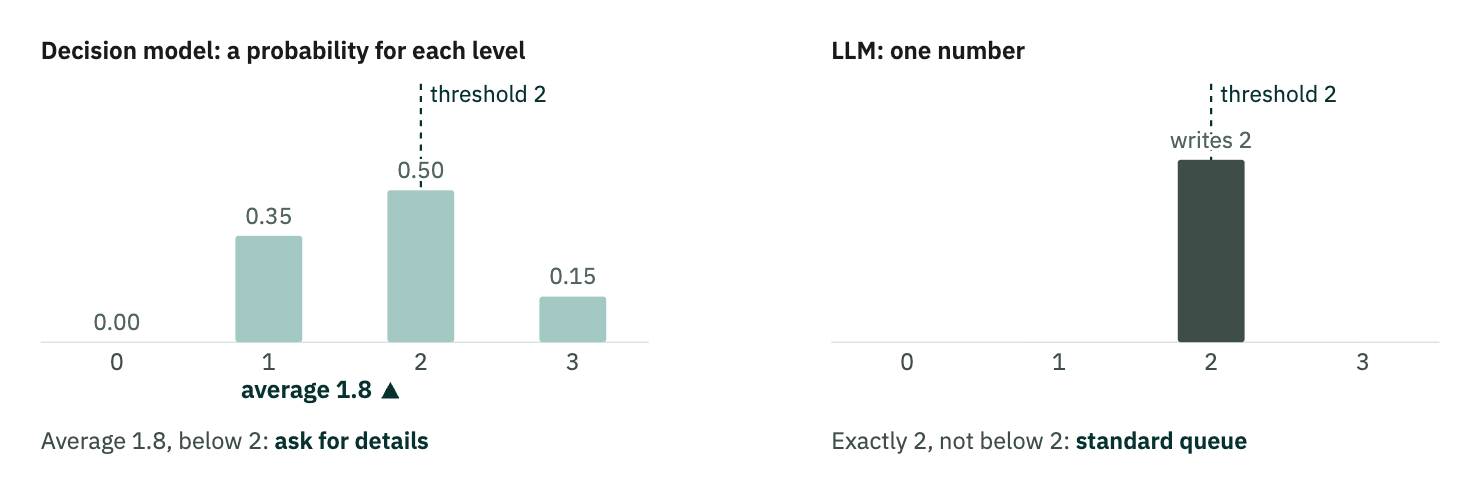
One borderline request, answered by each kind of model. On the real borderline requests, GPT-6 Luna Decisions' average had a median of 1.76. The LLM's 2 is what GPT-6.1 Sol and GPT-6 Luna wrote on them.
Together, fitting the thresholds moved accuracy by up to ten points, for decision models and LLMs alike. GPT-6 Luna Decisions is the exception: its answers already suited the intuitive thresholds. A comparison with untuned thresholds mostly measures how well each model happens to suit them.
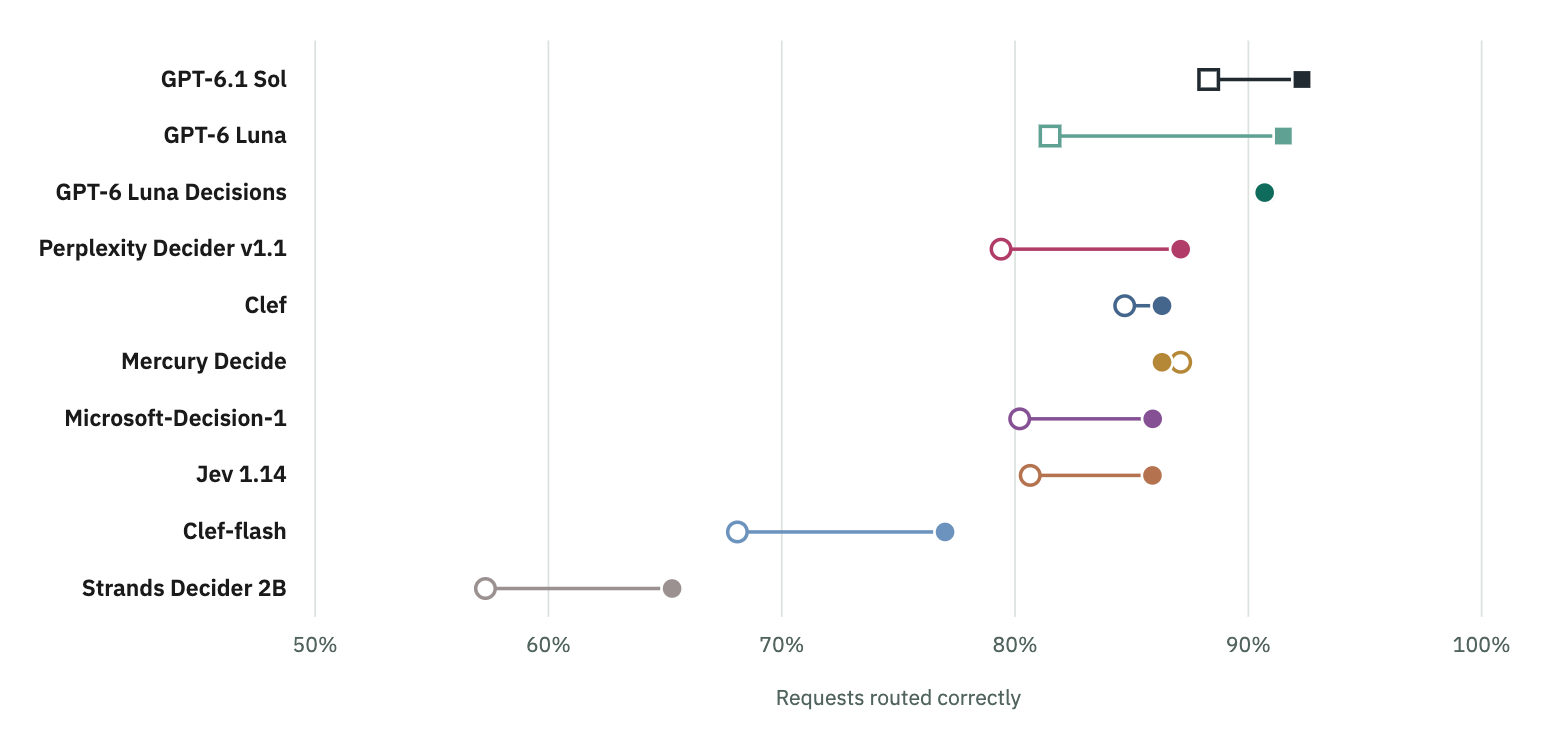
Open point: the intuitive thresholds: 0.7 for exceptions and 2 for completeness. Filled point, thresholds fitted on one half of the requests and scored on the other. Squares are LLMs.
A model's capability matters, but judging whether a decision model is right for your use case goes well beyond the model itself. It helps to go through it layer by layer, from the constraints you can't negotiate to the ones you can measure.
Data privacy. Start with what your data policy allows, because it rules options out before anything else. A hosted API is the fastest to start, but every request goes to the vendor; GPT-6 Luna Decisions, the most accurate decision model here, runs on OpenAI's platform. Some models run inside a cloud account you already govern, such as Microsoft-Decision-1 in Azure. Others publish their weights and run them on your own GPUs or, for the smallest, on a CPU, at the cost of hosting them.
Volume and speed. At a million requests a month, a decision model can cost a fraction of an LLM and answer in well under a second, which adds up in a live production system.
Evaluation on your own task. Public benchmarks won't tell you how a model handles your requests. A few hundred labeled examples will, and with decision models a full run costs a few cents. In Dataiku, each model sits behind the same agent, so swapping it takes one click, and a single prompt recipe runs the whole test set through every candidate. This is how we extended part 1's experiment to the new models.
The thresholds. As with evaluation, they need to fit your use case and its stakes. They depend on your process and on what a missed review costs compared with an unnecessary one, so fit them on your own labeled requests, for an LLM as much as for a decision model.
Traceability over time. A decision model's probabilities, stored with each decision, indicate how close each request came to the threshold, enabling close calls to be identified and reviewed.
Gone through in this order, the layers usually leave a few candidates. To test them in Dataiku, check out our decision models plugin for Structured Visual Agents: https://github.com/dataiku/dss-plugin-typesafe-ai.