Reproducible notebooks with uv and Marimo: an agent-trace case study
October 19, 2026/6 min read/Florent Devin
Imagine opening a notebook that claims one service is slower than another. Then, a week later, a colleague runs the same analysis but gets completely different results. The immediate thought is that the analysis is not correct. We should take into account the environment, the data, and the filters used, among other factors. Without those details, even a correct analysis is difficult to trust or extend.
To truly make a notebook reproducible, it requires more than just saving your output or exporting the notebook. It needs an explicit environment, identifiable inputs, calculations that can be checked independently, and a repeatable execution model. These requirements don't take much effort. They do, however, require us to view the notebook as part of a small project.
What we want is the ability to reproduce an analysis over and over, from one colleague to another, by using a single command. For example, if someone runs the command
uv run marimo edit notebooks/explore.py
This will lead to a notebook where everyone can see the same result of the analysis as shown below:
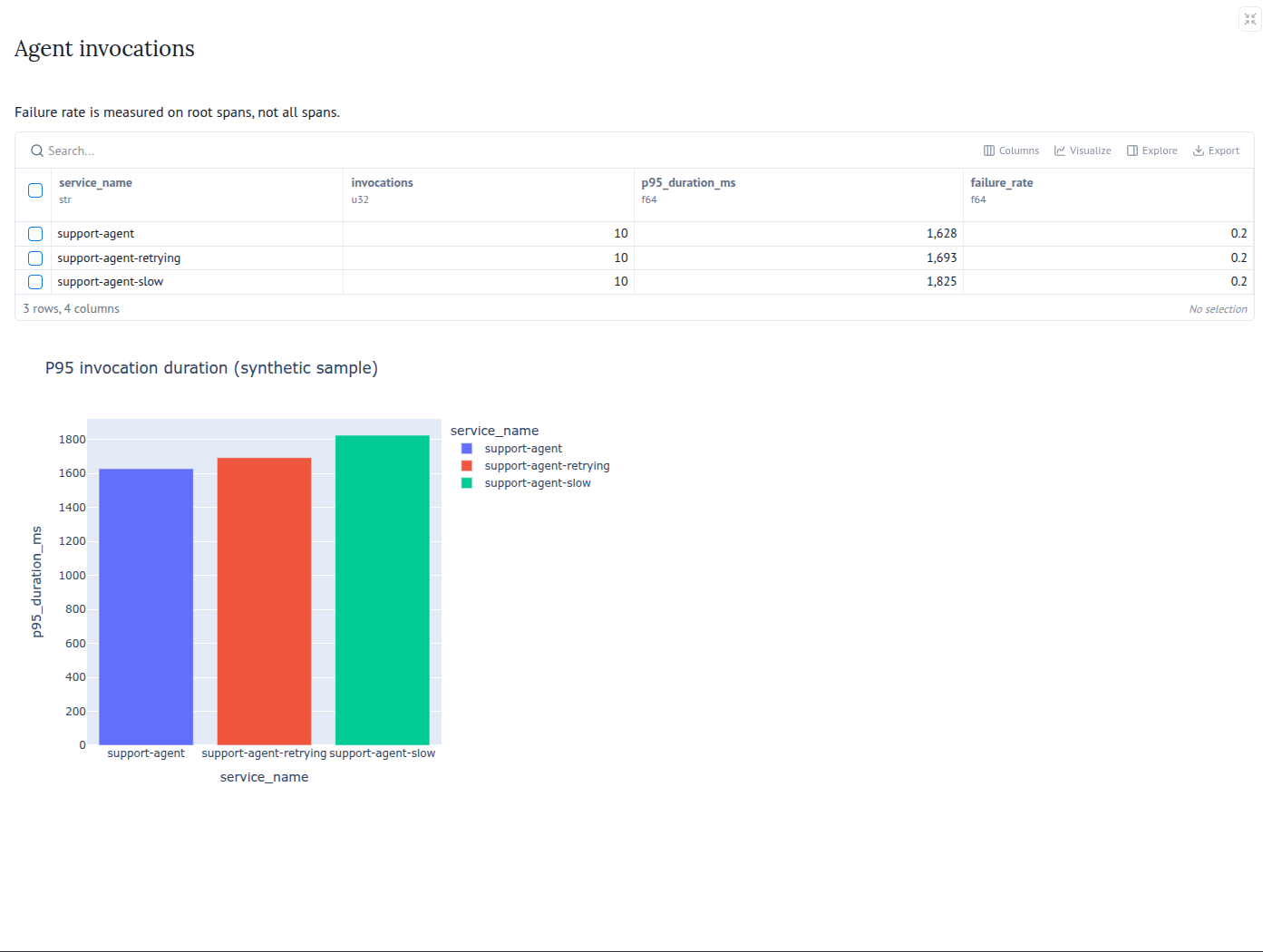
Let’s dive into how uv and Marimo tackle different aspects of ensuring that reproducibility. uv manages the Python project and dependency resolution. Marimo stores the notebook as Python source and connects cells through their dependencies. We will use both around a realistic example: investigating OpenTelemetry traces from a simulated support agent.
The agent is our data source. The notebook is the artifact we want someone else to rerun, inspect, and modify with confidence. You will build that local project from an empty directory. The different code sources are hosted on this git repository.
A notebook should have a clear answer to “which Python and packages produced this result?” With uv installed, start a packaged Python project:
uv init --package --managed-python --python 3.12 reproducible-notebook
cd reproducible-notebook
uv add marimo polars plotly numpy opentelemetry-proto
uv add --dev pytest
mkdir -p notebooks data tests
By executing these commands, you’ll kickstart your project using uv. The package layout lets notebooks and tests import the same analysis code, so keep the generated __init__.py and build-system configuration. mkdir creates empty directories that are populated afterward. Pinning Python 3.12 in .python-version does not make every operating system identical, but it removes an otherwise implicit part of the environment.
Having the environment definition alongside the analysis is essential for reproducibility. When an update to a dependency changes a result, reviewers must be able to see both changes. Do not use Marimo to update dependencies; use uv instead. It will help in having a reproducible environment. The local virtual environment can be recreated; it has no place in Git.
If your environment is locked, but the data it analyzes is deleted or changed, that analysis essentially loses its validity. A notebook reading “the latest traces” may be useful for live investigation, but the analysis alone does not preserve a record of the data it used. The data are therefore essential for reproducibility, hence why we have a data directory associated with our project.
When exposing data, there are several options, among them anonymizing it or generating it. If you choose to create a generator, as we did, consider using a fixed seed so that your data will always be the same. The data associated with the project simulates a small, entirely fictional trace snapshot. The simulated agent answers a question about an invoice: a model call requests lookup_invoice, a tool returns the invoice status, and another model call produces an answer consistent with that result.
The simulation also includes a timeout followed by successful recovery, and a timeout that definitively ends the task. Recovery creates another model/tool cycle with a new call identifier. A definitive failure does not invent an answer. These are scripted executions, sufficient to exercise an analysis without model credentials or production traffic.
We’ll use the OTLP format from OpenTelemetry—it's built for interchange and far more suitable than a custom CSV. Resources identify the services; spans preserve trace IDs, parent relationships, timestamps, messages, tool arguments, results, and synthetic model usage. JSON makes the sample inspectable locally, while Protobuf makes the same executions available to an OTLP receiver.
The gen_ai.* attributes distinguish agent, model, and tool operations. These conventions are still evolving; if needed, you can refer to the documentation. Our fixture contains only fictional messages and identifiers, so it can be shared without exporting real conversations. You can copy the data files from the GitHub repository to the data folder.
A notebook can run consistently and still calculate the wrong thing. While reproducibility helps verify the calculations, it doesn’t guarantee that the results are correct.
The agent example has a useful trap. A failed tool attempt returns an error, but a subsequent successful attempt allows the agent to finish its task.
Counting all errored spans as agent failures would therefore produce a misleading failure rate. The calculation should use the enclosing invocation spans:
roots = spans.filter(pl.col("operation_name") == "invoke_agent")
summary = roots.group_by("service_name").agg(
    pl.len().alias("invocations"),
    pl.col("duration_ms")
    .quantile(0.95, interpolation="nearest")
    .alias("p95_duration_ms"),
    (pl.col("status_code") == "ERROR")
    .cast(pl.Float64)
    .mean()
    .alias("failure_rate"),
)
You will find that logic in src/reproducible_notebook/telemetry.py, alongside the loader and per-invocation calculations. It decodes the generated OTLP document and exposes functions the notebook can import.
The separation gives us somewhere to check the rules without opening a browser. For example, you could create tests in the tests folder and run them with uv. This goes far beyond this article, but let’s consider that you have written a test file: tests/test_telemetry.py. You can run your test by using this command:
uv run pytest
A complete project would also include a small CI job to recreate the environment with uv sync --locked and run uv run pytest. That checks the dependency definition and deterministic calculations without requiring a telemetry backend. Interactive inspection remains useful, but it is no longer the only way to find a regression.
The remaining problem is execution state. A correct function and fixed input do not help if the analysis displays output calculated with yesterday’s filter selection.
Marimo expresses cell dependencies directly: changing an upstream value updates dependent cells; the service selector, filtered data, summary, and chart form one dependency chain. The notebook is stored as ordinary Python source, so those calculations and controls can be reviewed in Git alongside the generator and lockfile.
notebooks/explore.py contains a Marimo app and its cells. Imports and data loading are defined upstream; UI controls are created in separate cells from the calculations that read their values. This makes the service → data → summary → analysis relationship explicit. You can open the file in Marimo:
uv run marimo edit notebooks/explore.py
In the notebook, selecting All compares the three services from the same file. Selecting one service recomputes the invocation summary and operation chart. The outcome selector then focuses the invocation table on success, recovered, or failed; a trace selector exposes one execution’s timeline and decoded attributes.
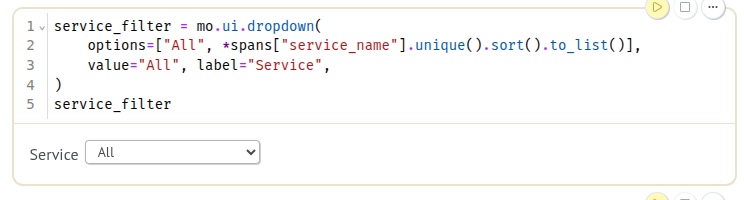
This gives the reader two levels of inspection. An aggregate can show that the retry-heavy deployment takes longer. An individual trace can explain why: the first tool call timed out, the agent waited before retrying, and the final response followed a successful second lookup. The slowdown has an execution behind it, not just a bar on a chart.
Reactive execution addresses stale dependent output inside the notebook. It does not freeze an external API or detect every change to a file on disk. If the trace sample is regenerated, rerun the loading cell or reopen the notebook so the analysis uses that input. When sharing a conclusion, record the service, outcome, or trace selection that produced it.
The reproducibility boundary is now explicit:
Python and dependencies: managed by uv.
Input data: stored in the data folder.
Methods for extracting the information: in the src folder; and tests in the tests folder.
Interactive exploration: in the notebooks folder.
Now, if you want to run this notebook from git, once you have cloned or updated, just enter the following command
uv sync --locked
uv run pytest
uv run marimo edit notebooks/explore.py
A colleague can use the same input, run the same calculations in the defined environment, and inspect the execution behind a result.
Reproducibility comes from making a notebook’s assumptions visible. uv defines the Python environment, a versioned data source makes the inputs identifiable, reusable functions keep metric definitions inspectable, and Marimo connects the interactive controls to the calculations they affect.
The simulated agent gave us a concrete way to exercise those choices. The same approach applies to another dataset: keep the environment, input provenance, analysis code, and parameters together. Then a colleague can reproduce a result, investigate a difference, and extend the notebook with a clear understanding of how it works.