Building a LangGraph agent in Dataiku
August 13, 2026/12 min read/Remi Rosenthal
This article was originally published on the Dataiku medium publication data from the trenches.
The project was born out of a personal pain point: the need to streamline remote work logistics — specifically, coordinating surfing trips to southwest France. Traditionally, this requires a recurring manual workflow whenever favorable conditions align:
Environmental Monitoring: Analyzing surf forecasts and wave conditions, primarily for upcoming weekends.
Schedule Synchronization: Reviewing professional calendars to identify mandatory in-person meetings or events in Paris.
Travel Procurement: Searching for available round-trip train tickets and managing booking logistics.
The goal of this project was to determine how an agentic system could automate these low-value administrative tasks, allowing for more efficient decision-making and eliminating manual oversight.
Press enter or click to view image in full size
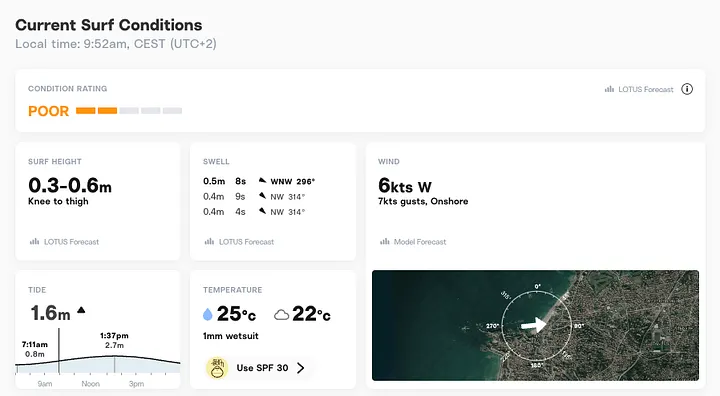
Developing the surf trip planner required a well-defined workflow, including specific data requirements, clear decision-making logic, and procedural milestones.
Code-based agents in Dataiku offer the flexibility of custom development alongside seamless platform integration. This ensures that custom agents can leverage the full suite of features available in Dataiku, operating with the same compatibility as native visual agents.
Specifically, code-based agents provide:
Graph Customization: The ability to design tailored logic graphs by blending standard workflows with ReAct loops.
Context Management: High-precision control over the information and state provided to the agent.
Operational Granularity: Fine-tuned oversight of the agent’s execution and reasoning processes.
Note: With the introduction of structured agents, users can now build sophisticated workflows using a no-code visual interface, offering an alternative for complex agent design.
The agent was developed using LangChain and LangGraph, both of which are industry-standard libraries for building agentic workflows. These frameworks offer seamless integration with Dataiku, providing a robust foundation for development.
A significant advantage of this stack within the Dataiku ecosystem is the ease of observability. For instance, the Traces Explorer web app — a dedicated tool for trace analysis — can be activated with a single line of code.
While alternative frameworks such as CrewAI or LlamaIndex remain viable options, the LangChain ecosystem was selected for its versatility and the efficiency it offers when operating within Dataiku.
The agent’s primary objective is to coordinate round-trip logistics for a surfing excursion. To ensure successful execution, the system must perform a comprehensive assessment of two critical variables:
Environmental Validation: The agent must verify that forecasted wave conditions align with predefined quality criteria.
Operational Feasibility: The itinerary must be cross-referenced with the user’s schedule to ensure the trip is compatible with existing professional and personal commitments.
The agent’s workflow is designed to automate the decision-making process through a structured sequence of operations:
Input Collection: The agent prompts the user for core journey parameters, including the destination and the desired timeframe.
Condition Assessment: The system analyzes surf forecasts for the specified dates.
Conditional Logistics Processing:If the environmental conditions meet the predefined quality threshold, the agent executes the following:
Availability Audit: It cross-references the user’s professional calendar to verify availability.
Travel Sourcing: It identifies the optimal round-trip train itineraries.
Final Recommendation: The process concludes with the agent presenting one or two concise, actionable travel options for final selection.
For an agent to transition from reasoning to execution, it requires access to tools — modular functions that allow it to interact with external data sources and services. To support the defined workflow, the following integrations were implemented:
Transportation Management: Utilizing the Navitia API to query real-time train schedules and availability.
Schedule Coordination: Leveraging the Google Calendar API to audit user availability and cross-reference professional commitments.
Environmental Data: Integrating the OpenMeteo API to retrieve precise surf conditions and wave forecasts.
With the requirements defined, we can outline the agent’s structural architecture. The system is designed around a multi-stage workflow to ensure precise execution and error handling:
Intent Classification — route_intent: The initial node identifies the user’s intent. This serves as a primary filter to ensure the agent responds accurately, particularly when handling out-of-scope queries or non-surf-related requests.
Information Parsing — update_trip_details: This node processes the user’s input to extract relevant parameters and determines the subsequent logic path:
Incomplete Data: If essential parameters are missing, the workflow triggers the request_missing_details node to prompt the user for the necessary information.
Complete Data: Once all parameters are validated, the system moves to the execution phase.
Execution and Orchestration: The planning phase consists of two primary components:
Environmental Validation: A deterministic Python function verifies surf forecasts against user preferences.
Travel Planning: An autonomous agent, using a ReAct (Reasoning and Acting) loop, orchestrates the logistics.
Response Generation: The workflow concludes by providing a concise summary of the proposed itinerary and travel options.
The following state diagram illustrates the agent’s workflow. To distinguish between execution types, nodes are color-coded as follows:
Blue Nodes: Represent deterministic logic (standard code or rule-based processing).
Pink Nodes: Represent LLM-powered decision points or generative tasks.
Conditional edges are named after the output of the decision function.
Note: While request_missing_detailsand handle_errorare currently driven by the LLM, these could also be transitioned to deterministic functions.
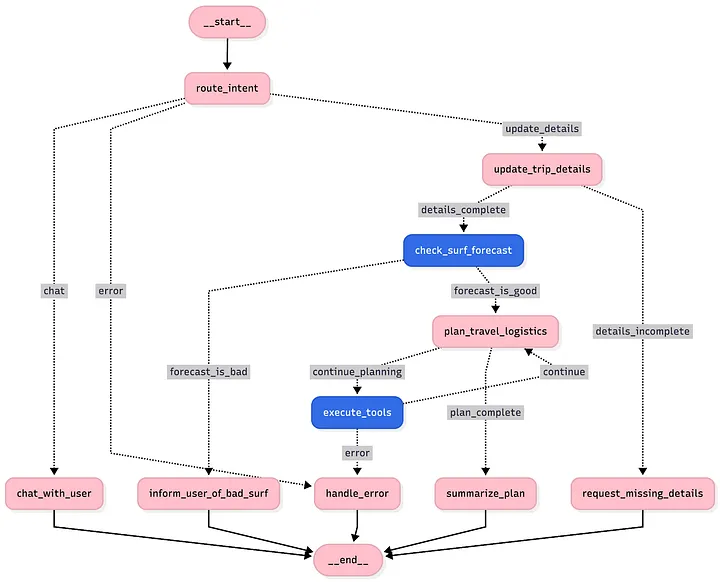
The architecture of a LangGraph agent is built upon several core components that manage the orchestration of logic and data flow:
The Graph: This serves as the primary orchestration layer. It defines the overall workflow and the specific sequence of operations by connecting nodes via edges.
Nodes: These are the functional units of the graph. In practice, nodes are Python functions designed to execute discrete tasks. They ingest the current state, process information, and return updates to be merged back into that state.
Edges: These define the transition logic between nodes. Edges can be static, following a predetermined path, or conditional, allowing for dynamic routing based on the agent’s reasoning or external data inputs.
State: Functioning as the agent’s persistent memory, the state is a shared schema maintained throughout the execution lifecycle. It enables seamless data persistence and communication between different nodes as the workflow progresses.
To ensure long-term readability and maintainability, it is highly recommended to adopt a modular structure by decoupling component definitions into distinct files or packages. The following directory structure illustrates the architectural organization implemented for this code-based agent:
surf_planner/
└── agent/
    ├── tools/
    ├── __init__.py
    ├── build.py
    ├── edges.py
    ├── graph.py
    ├── helpers.py
    ├── nodes.py
    ├── prompts.py
    └── state.py
└── apis/
config.pyThis file defines the agent’s graph architecture. It serves as the orchestration layer, utilizing nodes and edges to formalize the structural logic and execution flow of the agent’s workflow.
workflow = StateGraph(AgentState)

# --- 1. ADD NODES ---
workflow.add_node("route_intent", partial(node_route_intent, ...))
.../...

# --- 2. ADD EDGES & ROUTING ---
workflow.set_entry_point("route_intent")
workflow.add_edge("request_missing_details", END)
.../...

# --- 3. BUILD AGENT ---
agent = workflow.compile()This file houses the functional definitions of the agent’s nodes. In this architecture, nodes represent discrete tasks implemented as Python functions. A recommended best practice is to prefix these functions with node_ to maintain a clear distinction within the codebase. The internal logic of these nodes typically follows a consistent execution pattern: accessing the current state, performing the designated operation, and returning a state update.
def node_route_intent(state: AgentState, model):
    # 1. Read inputs from state
    msgs = "\n".join([f"{msg.content}" for msg in state["messages"]])
    .../...

    # 2. Do something
    classifier_chain = route_intent_prompt_template | model
    .../...

    #3. Return the update of the state
return {"current_intent": intent}This file manages the transitions between nodes. While many transitions are deterministic and follow a fixed path, conditional edges facilitate dynamic routing. These are defined as functions that analyze the current State to determine the most appropriate subsequent node based on the agent’s internal logic.
def edge_after_update(state: AgentState) -> str:
    # 1. Read inputs from state
    details = state.get("trip_details", {})
    .../...

    # 2. Apply some logic
    if all(details.get(key) for key in mandatory_keys):
        # 3. Return the next node
        return "details_complete"
    else:
        # 3b. Return the next node
return "details_incomplete"The State serves as the agent’s persistent memory. It is fundamentally a schema — typically implemented as a TypedDict — that allows for the storage and retrieval of attributes throughout the execution lifecycle. In this implementation, the state includes a dedicated object to track trip details, ensuring that contextual data is seamlessly maintained and accessible across all nodes in the workflow.
class TripDetails(TypedDict, total=False): ...

class AgentState(TypedDict):
    messages: Annotated[List[BaseMessage], add_messages]
    trip_details: TripDetails
    .../...
To finalize the agent’s construction, we must define and implement the specific tools required for execution and external interaction.
Tools are modular Python functions (though alternative structures, such as class-based implementations, are also supported) that augment the agent’s capabilities, enabling it to act autonomously. They should be viewed as specialized skills — for instance, a function dedicated to retrieving real-time surf forecasts.
To ensure the agent can utilize these functions effectively, it requires a clear definition of the tool’s purpose and its required parameters. In the implementation below, a tool is declared using the @tool decorator. The function’s docstring serves as the primary description interpreted by the LLM, while the Pydantic model provides a structured schema for the arguments.
Type Hinting: Explicitly defining the types for both inputs and outputs is a best practice that ensures code clarity and facilitates easier debugging.
Dependency Injection: In the provided example, the tool requires an external API client (e.g., a geolocator). This is managed via a wrapper function, allowing the client to be instantiated once and reused. While it is possible to instantiate clients directly within a tool, using a wrapper is more efficient; agents are not intended to manage the lifecycle of complex dependencies.
class SurfForecastArgs(BaseModel):
    spot: str = Field(description="The name of the surf spot or town.")
    .../...

# Tool
def create_surf_forecast_tool(geolocator: GeolocatorAPIClient, openmeteo: OpenMeteoAPIClient):
@tool(args_schema=SurfForecastArgs)
def get_surf_forecast(spot, from_date, to_date) -> list[DailySurfForecast]:
    """ Retrieve the surf forecast for a specific spot between two dates."""
    location = geolocator.get_coordinates(spot)
    forecasts_data = openmeteo.get_forecasts(...)
    return [DailySurfForecast(...) for f in forecasts_data]

return get_surf_forecast
The following tools were implemented for this project:
Surf Forecast Tool: Retrieves real-time wave conditions and meteorological data via the Open-Meteo API.
Rail Logistics Tool: Interfaces with the Navitia API (SNCF) to identify and source available train itineraries.
Calendar Integration Tool: Audits schedule availability by querying the Google Calendar API to ensure trip feasibility.
Developing an agent programmatically offers several distinct advantages for complex automation:
Design Flexibility: Code-based development allows for highly specialized and tailored workflows. This enables the creation of intricate logic structures — such as the graph-based architecture discussed earlier — that define exact operational behaviors.
Granular Control Over LLM Logic: Developers gain direct oversight of context management and prompt engineering for specific “intelligent” components. This ensures precise control over how individual nodes and tools interact with the underlying model.
Operational Optimization: Implementation at the code level facilitates bespoke optimizations, such as managing API session persistence and optimizing data retrieval patterns to improve performance and reduce latency.
Furthermore, leveraging the LangChain and LangGraph ecosystem streamlines development through:
Asynchronous Execution: Simplified implementation of streaming and asynchronous calls for better responsiveness.
Standardized Syntax: Utilization of LCEL (LangChain Expression Language) for cleaner, more readable code.
Built-In Observability: Integrated features like automated tracing provide comprehensive monitoring of node inputs and outputs by default.
Note: While a code-first approach offers maximum control, it also introduces significant complexity. This level of customization should be reserved for advanced requirements; in many scenarios, native no-code agentic features provide sufficient functionality to meet business objectives.
To accommodate the extensive coding requirements of this project, I opted for a local development workflow using PyCharm. While integrated options like Dataiku’s Code Studio are available, a local IDE provides the necessary flexibility and robust tooling required for this specific build.
The objective was to establish a seamless pipeline: developing and testing the agent locally before deploying it within the Dataiku environment. A primary focus of this setup was maintaining a portable codebase — minimizing the need for environment-specific configurations — to ensure the agent operates consistently whether running in a local terminal or within the Dataiku platform.
The implementation leverages Project Libraries, a centralized code repository within Dataiku designed for developing reusable modules. By centralizing the agent’s logic within these libraries, the code becomes highly portable and can be seamlessly imported across different platform components — most notably within the Code Agents.
This approach ensures a clean separation between the core logic and the platform’s orchestration layer, facilitating better version control and modularity.
To optimize the local development cycle, I leveraged the Dataiku extension for PyCharm. This integration facilitates the seamless synchronization of local source files with Dataiku Project Libraries, ensuring that code authored in the IDE is immediately available within the Dataiku instance (It is also possible to use Git).
Press enter or click to view image in full size
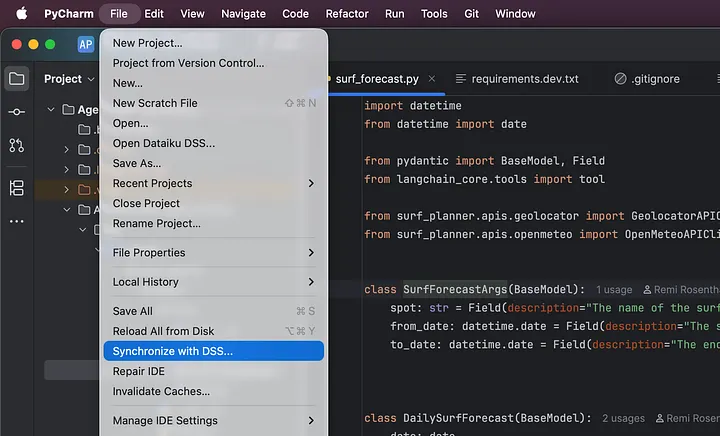
To facilitate local execution, it was necessary to mirror the Dataiku runtime environment. This was achieved by installing and configuring the Dataiku Python API client on the local workstation.
This setup ensures parity between the local development environment and the Dataiku platform. Consequently, API calls to instance resources — such as datasets, managed folders, or global variables — are executed seamlessly from the local machine, providing a robust and integrated debugging experience.
To deploy the agent within Dataiku, the initial configuration begins by creating a “code agent” through the project’s GenAI menu. Following this, a class must be defined to implement a specific interface, which enables Dataiku to orchestrate and execute the custom code.
Specifically, it is mandatory to implement a processmethod (note that asynchronous and streaming variants are also supported). This method serves as the entry point where the agent logic — previously defined in the Project Libraries — is imported. Dataiku invokes this function whenever the agent is triggered. Once the class and its processing logic are established, the agent is fully operational within the Dataiku ecosystem.
To minimize environment-specific boilerplate and enhance portability, the implementation utilizes an AgentBuilderclass. This component is responsible for assembling the agent by injecting all necessary dependencies, such as API clients and project-level parameters, ensuring a clean and modular initialization process.
.../...
from surf_planner.agent.build import AgentBuilder # from Project Libraries

class MyLLM(BaseLLM):

    def __init__(self):
        settings = ProjectSettings()
        client = dataiku.api_client()
        builder = AgentBuilder(settings)
        self.agent = builder.build()

    def process(self, query, settings, trace):
        messages = []
  # ... <format input messages> ...
        inputs = {"messages": messages}
        final_state = self.agent.invoke(inputs)
        final_answer_message = final_state["messages"][-1]
        return {"text": final_answer_message.content}
Once deployed, the agent can be leveraged across multiple channels within the Dataiku ecosystem:
Batch Processing: The agent can be integrated into a Prompt Recipe to process large-scale datasets efficiently.
Programmatic Access: It can be invoked via API, enabling integration into external applications or automated enterprise workflows.
Conversational Interfaces: The agent can be exposed through integrated interfaces such as Agent Hub, providing a natural-language front-end for users to interact with the underlying logic.
The ability to run the agent locally makes the use of LangSmith Studio seamless for advanced debugging. This tool transforms agent execution into an interactive process, providing a visual representation of the agent’s logic.
Key benefits of this local debugging workflow include:
Real-Time Visualization: Monitor node transitions and state updates dynamically as the agent executes.
State Inspection: Gain immediate visibility into the agent’s memory (the “State”) to ensure data persistence and accuracy across the workflow.
Advanced Control: Utilize breakpoints and the ability to re-run execution from a specific node using a pre-defined state.
Once LangSmith is configured locally, initiating the development server is straightforward: simply run the langgraph devcommand to access the interactive visual interface and begin auditing the agent’s reasoning process.
Press enter or click to view image in full size
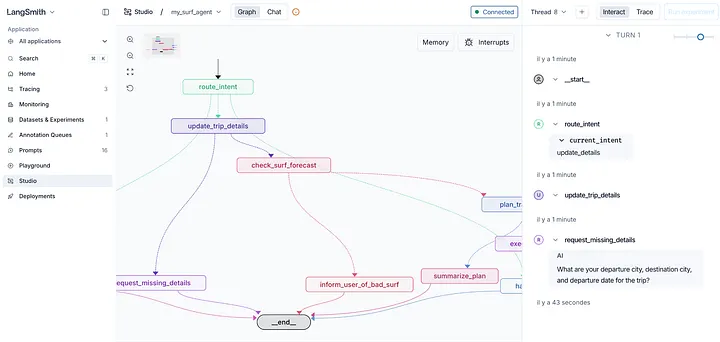
As previously highlighted, the code-based agent is integrated within the Dataiku ecosystem. For this project, we leveraged Agent Hub — a plug-and-play web application — to provide a streamlined conversational interface for end-users.
The agent is integrated into the “enterprise agents” catalog, where we configure curated sample queries to guide user interaction. With this final configuration in place, the system is fully prepared for functional testing and deployment.
Press enter or click to view image in full size
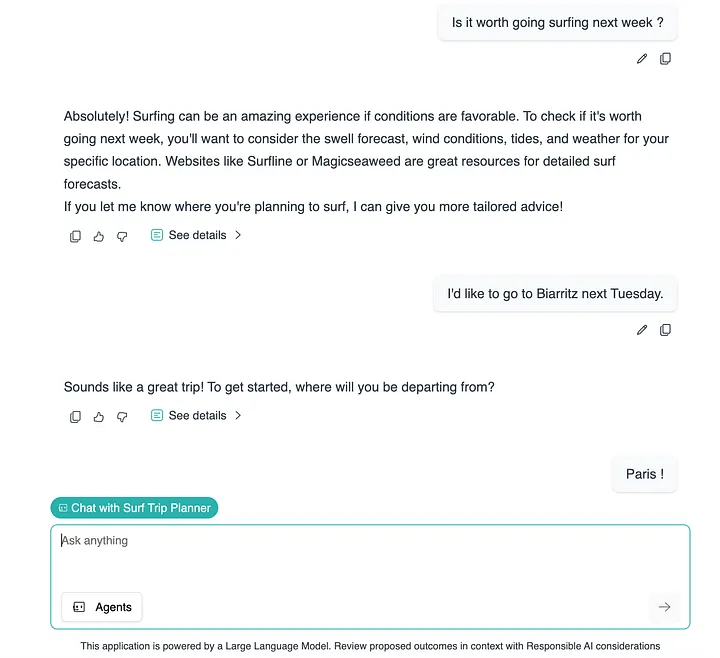
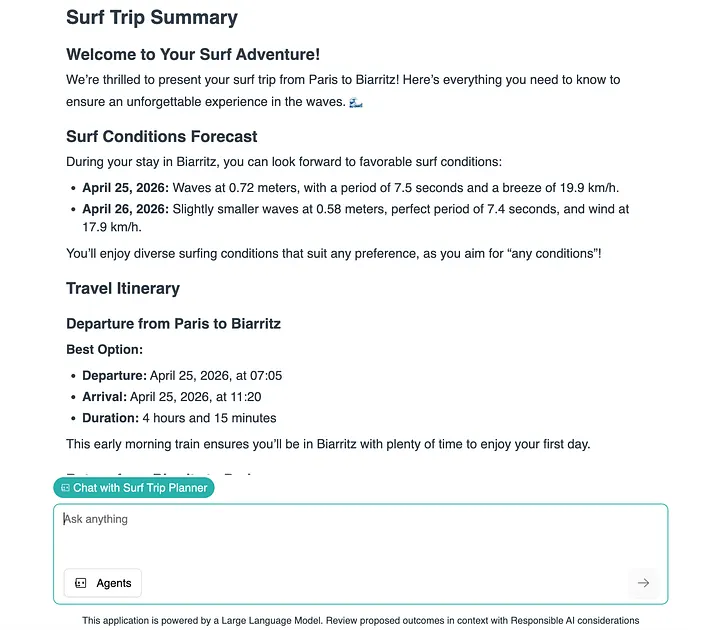
The agent prompts the user for specific journey parameters and, upon confirming that all environmental and logistical criteria are met, executes the planning workflow. The following output illustrates the agent’s performance for a sample weekend:
Press enter or click to view image in full size
This project demonstrated how to build a sophisticated code-based agent by addressing a practical logistics challenge: automating the planning of surfing trips.
By leveraging LangGraph, we developed a robust solution that coordinates complex workflows, manages state persistence, and utilizes specialized tools to interact with external APIs. This architectural approach provides the flexibility and control necessary for handling non-linear tasks that go beyond the capabilities of standard automation.
Furthermore, we explored how a local development workflow — combining a traditional IDE with the Dataiku API client — provides an excellent developer experience.
Ultimately, this implementation serves as a successful proof of concept, showing how autonomous agents can effectively eliminate repetitive administrative tasks and streamline complex decision-making processes.
Tags